Today I am going to spend some time familiarizing myself with the Check Point Security Gateway R77. I'll go through install (briefly, because it's simple, but this will be covered in day one) and have an initial look around the portal.
I am not counting this as the start of the 15 days countdown, that will begin once the lab has been built up and I am ready to dive in properly. This is just an overview.
So this is just a play around at the moment.
During install you are asked to complete some language options, IP addressing and give a password for the admin account. Not much to it, but we'll go through it properly on Day one.


 Let's get those bad-boys un-greyed!
Clicking on the green "Download Now!" button downloads SmartConsole.exe, which is just under 300MB. It would be nice to have a Mac app, but it all uses Microsoft's .NET, and will ask you to install the Visual C++ 2005 redistributable package, if you don't already have it installed. Being Microsoft it takes a while to install the redistributable package.
Once done the SmartConsole install launches, I accept all the options, and it's going to take up about 800MB on my laptop.
Anyway, before we go jumping into the SmartConsole, let's see what else is on the main portal page.
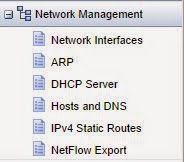
The the top we have the Network Management options, here we can do the basics such as IP address assignment, ARP, setting up a DHCP server, DNS, static routing and we can export to a NetFlow collector:
Next we have System Management, too much to go into at the moment, but they are all pretty self-explantory:

Next we can do Advanced Routing, we can see that it supports BGP, Multicast, RIP and OSPF. We can also do some summarization, filtering, redistribution and PBR:

User Management - this is where we can connect to LDAP servers.

The R77 supports VRRP (which is an industry standard) for High Availability.

The penultimate option is Maintenance, here we can license the product, and do backups.


I am not counting this as the start of the 15 days countdown, that will begin once the lab has been built up and I am ready to dive in properly. This is just an overview.
Check Point R77 install
I have started a brand new VM, its got 8GB storage and 2GB memory. We are not running a distributed system - which is why I am not classing this as day one. The exam topics state that we should be able to:- Design a distributed environment using the network detailed in the course topology.
- Install the Security Gateway version R77 in a distributed environment using the network detailed in the course topology.
So this is just a play around at the moment.
Install is easy. Build a VM, and boot from the ISO image. During the install, which if you have ever installed a recent version of a Red Hat Linux (and this includes Centos), will look very familiar.
During install you are asked to complete some language options, IP addressing and give a password for the admin account. Not much to it, but we'll go through it properly on Day one.
Once it has finished you can navigate to the IP address you have chosen using your browser, it's on https by the way. Logging in you then run through the final steps of configuration, including the role that the system will be, mainly management, or gateway, or both. I left all the defaults, but you can change your IP address if you want, all I added was the DNS servers. Once done you can reboot and then you are ready to rock.
Check Point Gaia R77 interface
The interface is nice, we have all our interesting configurable stuff down the left hand side, which we'll look at in a moment, but until then, let's look at the main screen.
Firstly we have a banner telling us to "Manage Software Blades using SmartConsole", and our system details:
Beneath that we have our network configuration:
And, to the right, we have our blades, which are all greyed out:
Clicking on the green "Download Now!" button downloads SmartConsole.exe, which is just under 300MB. It would be nice to have a Mac app, but it all uses Microsoft's .NET, and will ask you to install the Visual C++ 2005 redistributable package, if you don't already have it installed. Being Microsoft it takes a while to install the redistributable package.
Once done the SmartConsole install launches, I accept all the options, and it's going to take up about 800MB on my laptop.
Anyway, before we go jumping into the SmartConsole, let's see what else is on the main portal page.
The the top we have the Network Management options, here we can do the basics such as IP address assignment, ARP, setting up a DHCP server, DNS, static routing and we can export to a NetFlow collector:
Next we have System Management, too much to go into at the moment, but they are all pretty self-explantory:
Next we can do Advanced Routing, we can see that it supports BGP, Multicast, RIP and OSPF. We can also do some summarization, filtering, redistribution and PBR:
User Management - this is where we can connect to LDAP servers.
The R77 supports VRRP (which is an industry standard) for High Availability.
The penultimate option is Maintenance, here we can license the product, and do backups.
Finally, here is where we come to do any software updates.
So far, the interface looks pretty easy to navigate. The downside, though is that all the routing stuff takes place here, and all the firewall stuff takes place in the SmartConsole.
There doesn't appear to be anything in the exam topics that requires any of this routing though, so we'll push on by looking at SmartConsole in the next post.

